
Troubleshooting
General Setup Troubleshooting
If after following the relevant setup guides, issues persist, send an email to:
support@non-lethal-applications.com
Please supply as much information as possible, including:
- Computer type
- Operating System
- DAW Type
- DAW Version
- Video File codec type
- Video File frame rate
- Avid®/AJA/Blackmagic Video Device Output Format settings
- Has the issue just started occurring or has this been an issue from when the app was first used?
- If this is something that started happening at some point, can it be pinned down to something specific like a new version of our app, a new OS version, a change in the hardware setup or a specific media file?
- Which connection method is being used - MTC/MMC, DAWLink, HUI, or Avid® Satellite Link?
General approach to dealing with more serious performance issues
If Cue Pro is crashing or stalling with a beach-ball, consider the following questions:
- Has this worked before?
- If yes, what changed?
- Has Cue Pro recently been manually or automatically updated to a new version?
- Are different movie or audio file formats being used?
- Is different hardware being used?
- Is this reproducible?
- If yes, how?
- Does Cue Pro hang (app is frozen with a spinning beachball)?
- Or does Cue Pro crash (exits with or without a Crash Reporter message)?
Cue Pro crashing with a Crash Reporter window
For issues where Cue Pro unexpectedly quits with a Crash Reporter window, choose the option to save the crash report. If this option is not available, copy the Crash Reporter window content to a text file and email it to support@non-lethal-applications.com to assist in diagnosing the cause. Include details of what was happening when Cue Pro crashed, along with a full system spec - including macOS, Cue Pro and DAW version numbers.
Cue Pro crashing without a Crash Reporter window
For issues where Cue Pro unexpectedly quits without a Crash Reporter window, follow this procedure to generate crash reports:
Download the NLA Debugging Helper app here
Upon launching the Debugging Helper, the following window appears:
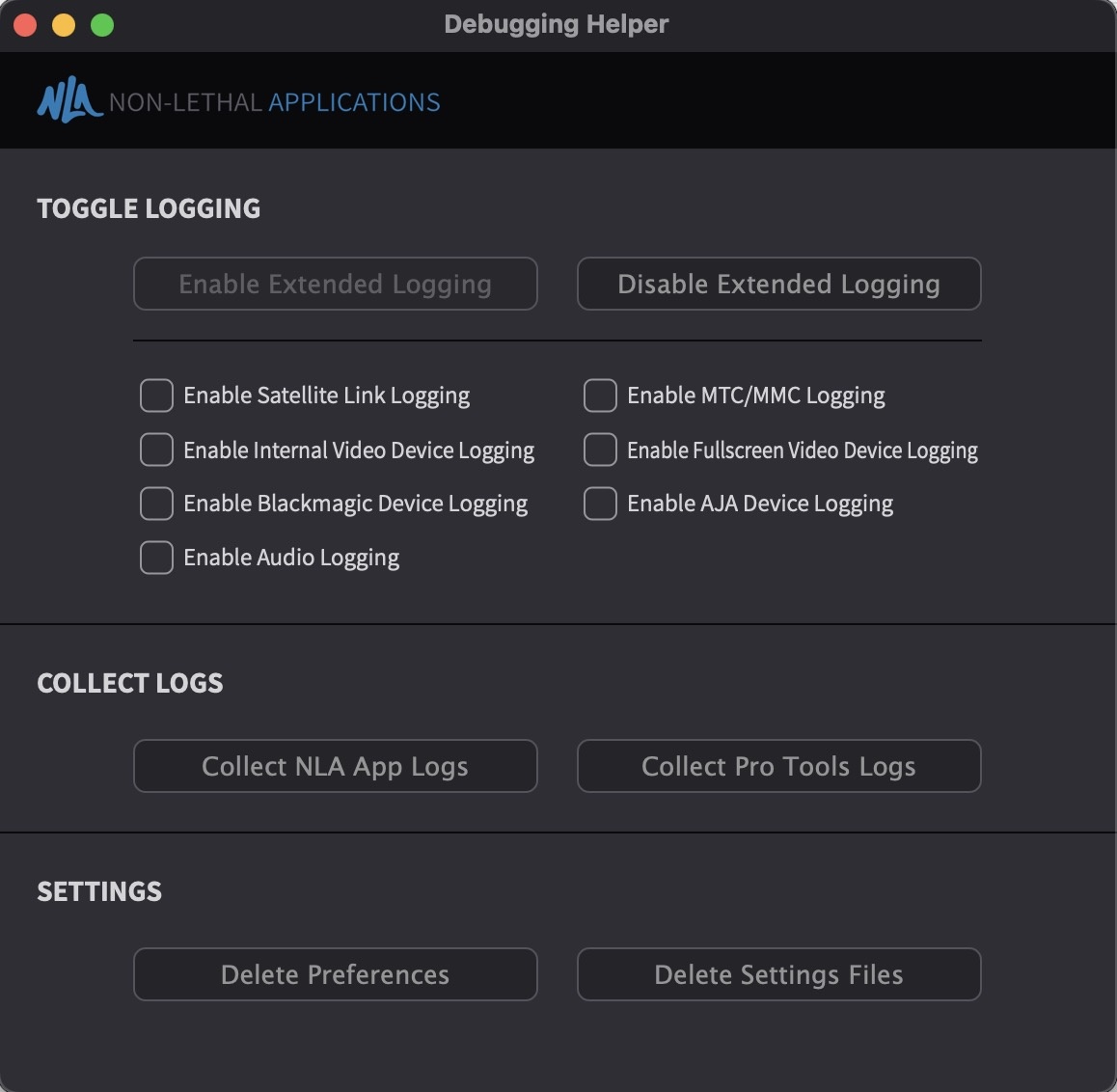
Click on the Collect NLA App Logs button. If using a Pro Tools Satellite connection when the crash appears, click on the Collect Pro Tools Logs button as well.
Select the file(s) on the Desktop called NLA_Logs.zip (and PT_Logs.zip) and email them to support@non-lethal-applications.com to assist in diagnosing the cause. Include details of what was happening when Cue Pro crashed, along with a full system spec - including macOS, Cue Pro and DAW version numbers.
Cue Pro hangs or stalls with a spinning beachball
For more serious performance issues such as Cue Pro hanging irrecoverably with a spinning beachball mouse pointer, a Process Sample is required during the beachball. This analyses Cue Pro and captures a snapshot of the state of all threads within the app, which assists in diagnosing the cause.
To create a Process Sample when Cue Pro is beachballing, go to Applications → Utilities and double-click to open Activity Monitor.
Select Cue Pro in the list so that it is highlighted. If many apps are open, it may be easier to find the Cue Pro process in the list by sorting the list alphabetically by clicking the Process Name heading. Alternatively, the search box in the top right hand corner can be used.
Click the gear symbol in the menu bar and select Sample Process.
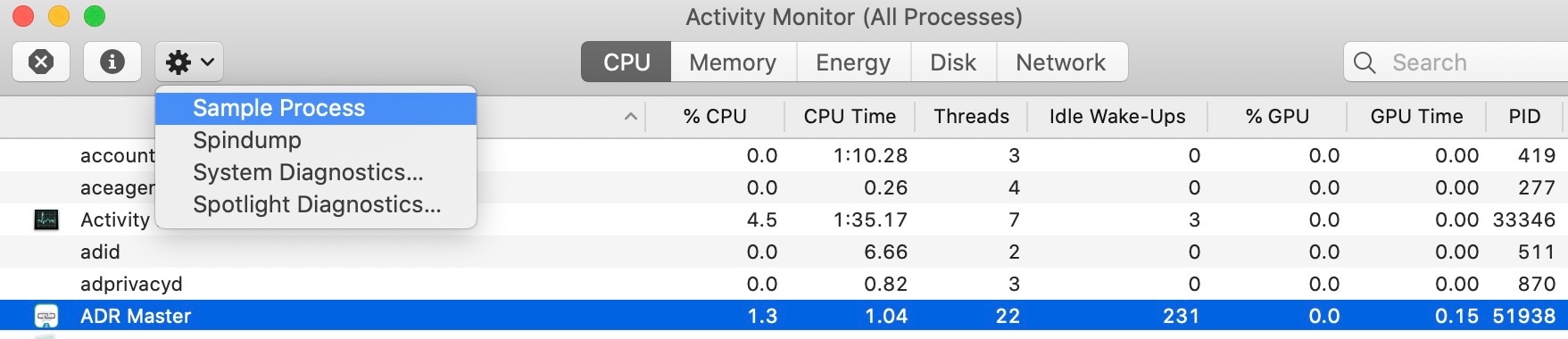
It may take a few seconds until a new window opens offering to save the files.
Save that sample to a text file and email it to support@non-lethal-applications.com to assist in diagnosing the cause. Include details of what was happening when Cue Pro stalled, along with a full system spec - including macOS, Cue Pro and DAW version numbers.