
We have just released Cue Pro 26.9.2 and Video Sync 6.2.11. The headline feature is the new PDF Template Designer in Cue Pro, joined by timecode tracks in movie exports, smoother playback and timeline handling, a reworked export dialog and a long list of refinements and fixes across both apps.
Get Cue Pro 26 → | Get Video Sync 6 →
Design your own PDF cue sheets
Every studio has its own idea of what a cue sheet should look like. Until now, PDF exports in Cue Pro were limited to switching fields on and off in a fixed layout. Cue Pro 26.9 replaces that with a full visual PDF Template Designer: you design the page itself, and the export follows your design.
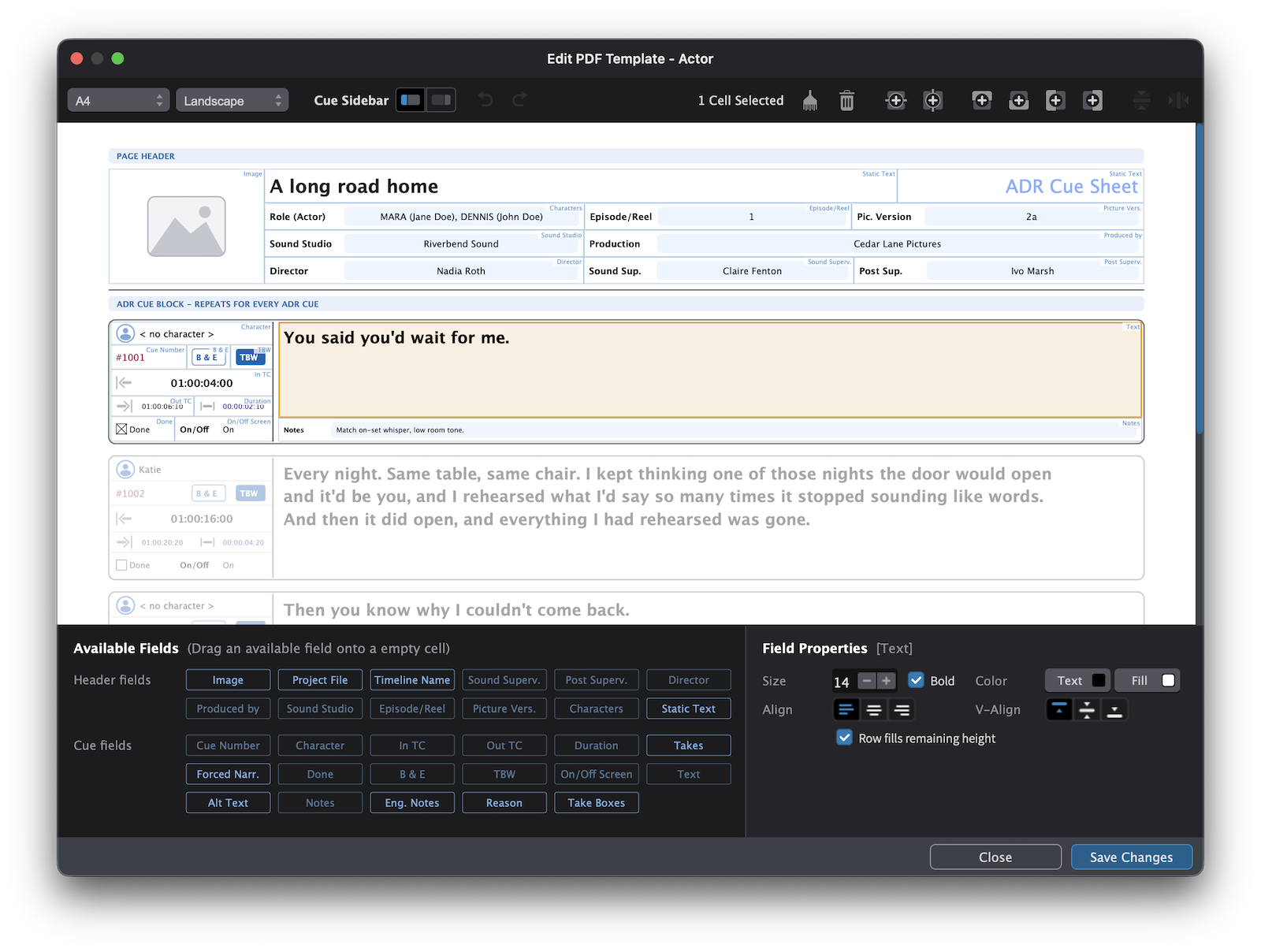
The designer opens straight from the export dialog and shows your layout on a page canvas filled with sample data, so you see the finished sheet while you build it. Drag fields such as cue number, timecodes, character, actor, dialogue, notes or take information from the field palette onto the page. Arrange them in rows and columns, add, split or merge cells, and set the width of each column. Each cell can carry its own prefix label, font size, bold, italic, colors and alignment, and long text can either grow with its content or be truncated to keep rows compact.
A template is made of three areas: a page header with a logo slot and any project fields you want at the top, a sidebar next to every ADR Cue and the cue content itself. Rows can be given a minimum height, and one row per area can stretch to fill the remaining space, which makes it easy to leave room for handwritten notes on the printed sheet. Undo and redo cover every step, and your templates are stored as files that you can duplicate, rename and share with colleagues.
Cue Pro ships with ready-made templates for actors, directors and engineers, so you can start from a layout that already fits the role and adjust it from there. Events that share a cue number can be combined into a single box on the sheet, and the export dialog remembers which layout you used last for each format.
Read more in the Cue Pro 26 manual →
New in Video Sync & Cue Pro
Timecode tracks in movie exports
Exported movies now include a timecode track. Pro Tools, DaVinci Resolve and Frame.io pick up the correct start timecode, and re-imported exports position themselves automatically on the timeline.
Smoother playback and timeline handling
Video playback in the internal video window is smoother on macOS 14 and newer, with picture-to-sound sync accurate to within one display refresh. Timeline zooming and scrolling are smoother as well: pinch zoom runs continuously and stays anchored under the pointer. Shuttle reacts faster when you switch direction and now correctly ignores the pre-roll.
Selection and editing refinements
Timeline Range selection has been refined throughout. Pro Tools style numpad shortcuts trim the selection start (Opt & Numpad -/+) and end (Cmd & Numpad -/+), clicking a track header moves the selection to that track, and Shift+I / Shift+O trim the current event to the selection edges. In Target Event mode, shift-clicking an already selected event removes it from the selection, and head and tail nudges trim the targeted event directly, from the keyboard as well as from Stream Deck. With no event targeted, the nudge trims the media region and its linked audio guide together.
Event List improvements
The Event List follows playback as soon as a project is opened, keeps one extra row of context visible when it scrolls to an event, and shows disabled events grayed out. Previous/next event navigation skips disabled events.
Importing shot changes
Importing an EDL onto a track that already holds scenes or shot changes now offers to add to or replace them and reports cuts that are already on the track. The same applies when running the video analysis.
Updated media engine
The media engine has been updated for improved compatibility with current video and audio formats. Audio playback with certain files is more reliable, exports at high frame rates keep audio and video in sync, and audio scrubbing keeps the playhead in place on every audio track.
Launch and privacy
A new first-launch dialog lets you choose update checks and usage statistics in one place, and crash reports are now confirmed individually before they are sent.
New in Cue Pro
Reworked export dialog
Word and PDF layouts now have separate lists with clearer per-format settings pages. New Director and Post Production Supervisor project fields are included in Word exports and available on PDF layouts, and TTAL files now carry talent names and character images on both import and export. TTAL exports also carry the timeline's destination language, which the batch export window shows in its own column.
ADR Cues and overlays
Open ended ADR Cues now end their overlays at the right time during playback, and secondary streamers follow them during rehearse, record and review. The Line-Based overlay shows bold, italic, underline and strikethrough formatting, and ADR Cues covered by a mouth-off or semi-off detection symbol are marked with a solid or dotted line on the timeline and in the Rhythmo Bande overlay. Anchor handles hide when the timeline is zoomed out, so crowded events stay easy to select, and anchor placement has been improved so anchors always land at the intended position in the text.
Event List and properties
Done ADR Cues are highlighted in the Event List with a green marker and row tint. Streamer colors can be overridden per event in the Properties panel, with a clear indicator when an override is active and Cmd+click to reset. Assign Cue Numbers remembers the zero padding setting, and CueLink shows an event's Alt Text in the editor layout and updates it live.
Script import and Pro Tools
Script import now joins multi-line cue text with spaces, Alt+Click on the first line of a multi-line take selects the whole take, and Undo/Redo in the Script Import window has been fixed. DAW Track Matrix settings are kept when a Pro Tools track is hidden and shown again, and ADR Cues keep their position when opening or reopening a Pro Tools session with a non-zero start timecode.
How to get it
If you have a Cue Pro 26 or Video Sync 6 license, perpetual or subscription, simply use the in-app updater (Check for Updates), or download the latest version from our website.
New to Cue Pro or Video Sync? Download the free 30-day demo to try everything, or pick a license on the Cue Pro 26 or Video Sync 6 product page.
Cue Pro 26 requires macOS 13.7 Ventura or later; Video Sync 6 runs on macOS 10.15 Catalina or later. Both are also available for Windows 10/11 (22H2 or later).
Where to go from here
- Visit the Cue Pro 26 product page
- Visit the Video Sync 6 product page
- Contact us at support@non-lethal-applications.com with any questions