
We have just released Cue Pro 26.8.1 and Video Sync 6.2.7. featuring new transcription-to-cue workflows, track pinning, Take Number and Region Name overlays, improved Live Events, HDR and color work, and a large round of stability fixes across both apps.
Get Cue Pro 26 → | Get Video Sync 6 →
New in Video Sync & Cue Pro
Region Name Overlay
The name of the video region currently playing can be shown as an overlay, so you always know which version of the video you are viewing. In Dual Display mode, each section shows its own region name, making it clear which section belongs to which video file. Position, size, font and colors have their own settings page, with a per-device toggle in the Display preferences.
HDR & color
HDR videos (HLG and PQ) are now automatically tone mapped on displays that can't show HDR, SDR color rendering now matches QuickTime, exported videos include full color information, and 10-bit video quality is enabled automatically based on your license.
Improved fullscreen behavior
The menu bar now stays visible on all displays in fullscreen, and the screen selection remembers the correct display across restarts.
Stability
A round of fixes across video output, transcription, media relinking, and application shutdown.
New in Cue Pro
Create events from transcription
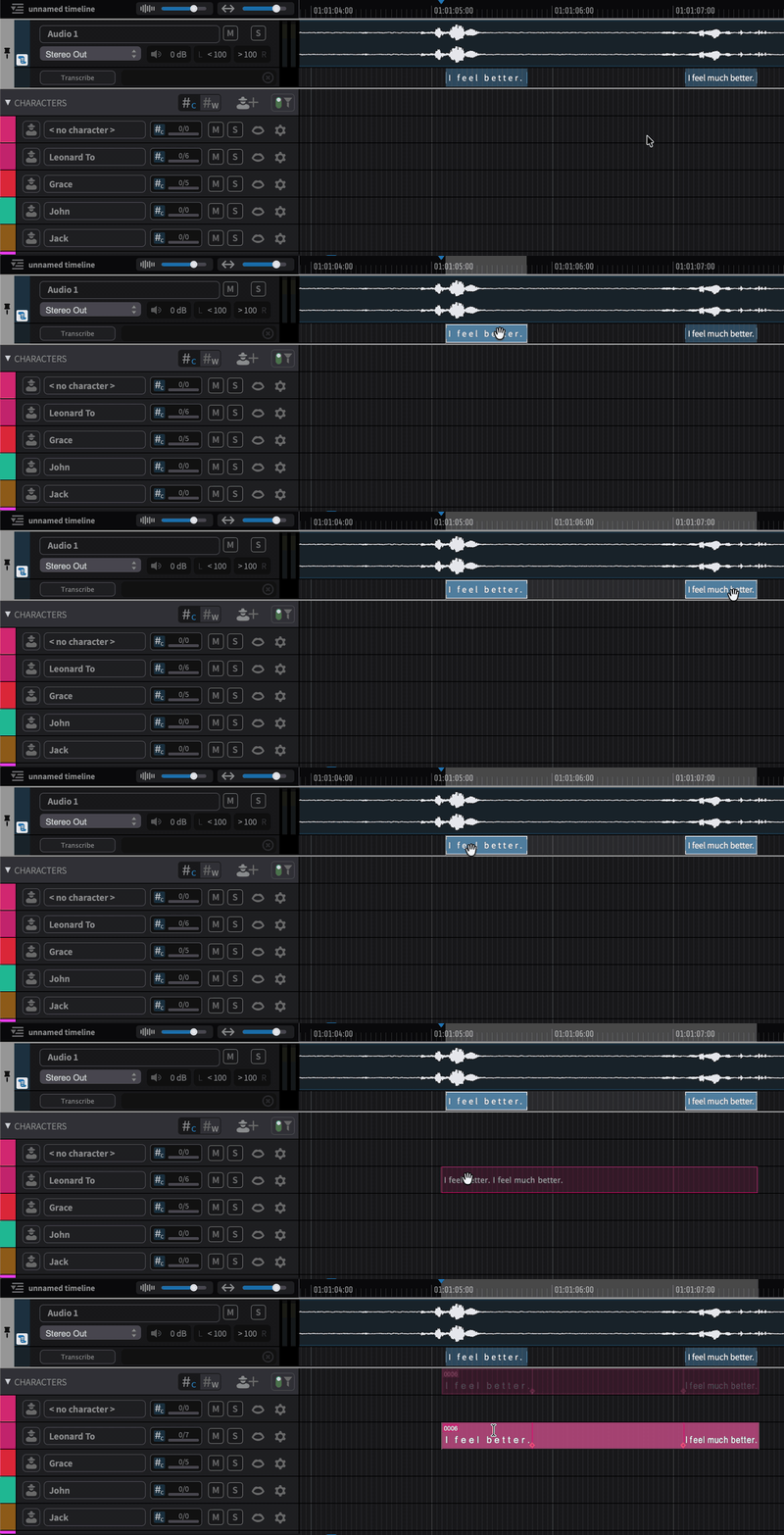
Drag a transcription segment onto an event track and it becomes an event with the segment's text and timing. In Media Mode this works straight from the transcription lane on your audio tracks. In Integrated Mode, the new standalone Transcription Track enables the same workflow: import your Pro Tools transcription to the track and create events by drag and drop. A multi-segment selection becomes a single event with the combined text and timing.
Transcription-Aided Script Import
When importing a script or dialogue list, Cue Pro can now match the script's lines with the dialogue transcription to find each line's position automatically. Matched lines show a confidence indicator and timecode, can be auditioned directly from the import window, and committed in bulk as ADR Cues. The Script Import Window also detects the script's pattern automatically, so imports take less setup.
Track Pinning
Pin one or more tracks to a fixed section at the top of the timeline. When you work with many character tracks, the waveforms you rely on stay in view while you scroll the rest.
Take Number Overlays
Line-based ADR Cues can now display the current take number during record passes, with full control over the look, per-device toggles, and display preset support.
Live Events improvements
Live Events now also work without a range selection in Pro Tools: tab to a clip or clip-group boundary and start a rehearse, record, or review pass with full pre-roll and text overlays.
Several smaller changes
Character thumbnails ask for confirmation before deletion, Rhythmo Bande character and actor names appear exactly as typed, and overlay text rendering has been improved.
How to get it
If you have a Cue Pro 26 or Video Sync 6 license, perpetual or subscription, simply use the in-app updater (Check for Updates), or download the latest version from our website.
New to Cue Pro or Video Sync? Download the free 30-day demo to try everything, or pick a license on the Cue Pro 26 or Video Sync 6 product page.
Cue Pro 26 requires macOS 13.7 Ventura or later; Video Sync 6 runs on macOS 10.15 Catalina or later. Both are also available for Windows 10/11 (22H2 or later).
Where to go from here
- Visit the Cue Pro 26 product page
- Visit the Video Sync 6 product page
- Contact us at support@non-lethal-applications.com with any questions